

Ask five providers what Tally on cloud costs and you will get five different answers. One quotes ₹399, another ₹1,299, a third says ₹5,000. The confusing part is that they are often talking about different things.
Here is the simple truth. Your monthly bill has two parts: the cloud server that runs Tally, and the Tally licence itself. Most quotes show only the first part. In this guide, I will put both together so you know the real number before you pay anything.
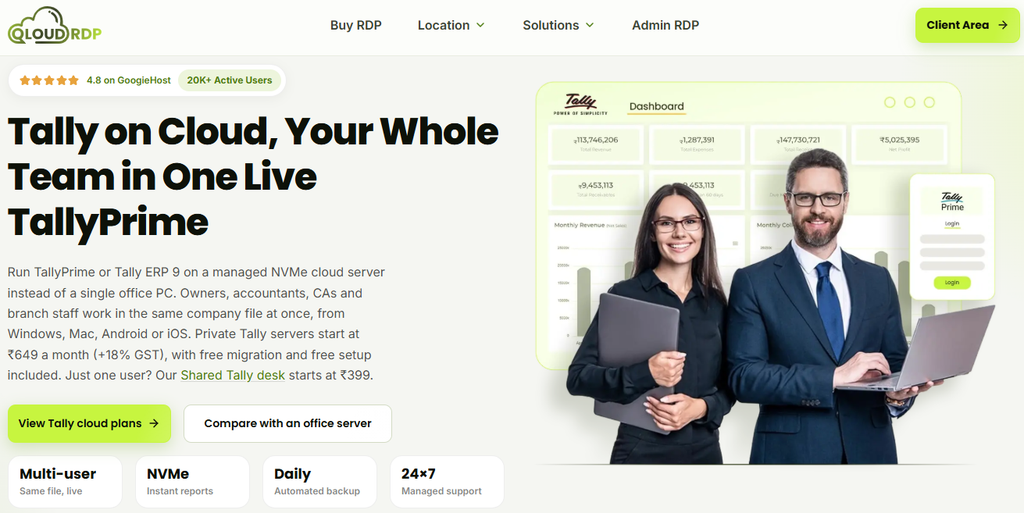
At QloudRDP, private Tally cloud plans start at ₹649 a month, with free setup and free migration. Prices below are current at the time of writing and are shown without 18% GST unless I say otherwise.
Table of Contents
What TallyPrime on Cloud Really Costs per Month
Let me start with the answer most people are looking for. This table shows the total monthly cost for three common team sizes, in two situations: you already own a Tally licence, or you rent one.
| Your Team | Cloud Plan | You Already Own Tally | You Rent Tally Too |
| 1 user (solo CA, shop owner) | Tally Essential | ₹649 (about ₹766 with GST) | ₹1,399 (about ₹1,651 with GST) |
| Up to 5 users | Tally Ultra | ₹2,199 (about ₹2,595 with GST) | ₹4,449 (about ₹5,250 with GST) |
| Up to 10 users | Tally Infinity | ₹4,299 (about ₹5,073 with GST) | ₹6,549 (about ₹7,728 with GST) |
The rental column uses the monthly rental price of Tally Silver for one user and Tally Gold for teams. A 12 month rental or buying the licence outright costs less over time, and I explain that below.
The Four Parts of Your Tally Cloud Bill
1. Cloud Hosting
This is the server that runs Tally for you: CPU, RAM, NVMe storage, Windows Server, backups and support. It is what you pay your cloud provider every month, and it depends on how many people use Tally at the same time and how big your company file is.
2. The Tally Licence
Tally is a separate cost, and this is the part most quotes leave out. Tally Solutions sells TallyPrime as a one time licence or as a rental. These are the current list prices, excluding GST.
| Edition | Who It Is For | Buy (One Time) | Rental | Yearly Renewal (TSS) |
| Silver | One user | ₹22,500 | ₹750/month or ₹8,100 for 12 months | ₹4,500 |
| Gold | Multiple users | ₹67,500 | ₹2,250/month or ₹24,300 for 12 months | ₹13,500 |
The first year of Tally Software Services (TSS) is included when you buy or rent. After that, renewal keeps your software updated with the latest GST and statutory changes. Tally can revise these prices, so confirm the current figure with Tally Solutions or an authorised partner before you buy.
A simple rule: if only one person logs in, Silver is enough. If two or more people work on Tally together, you need Gold.
Already own a licence? You do not need to buy another one. We install and activate the licence you already have, and if you do not have one yet, we help you buy or renew it during setup.
3. GST
All prices above exclude 18% GST. If you run a business, you can usually claim it as input tax credit, but check this with your CA.
4. Optional Extras
Larger storage, more users than your plan allows, or a custom configuration can raise the bill. Free setup, free migration and daily backups are already part of every plan, so you are not paying extra for those.
Our Tally on Cloud Plans
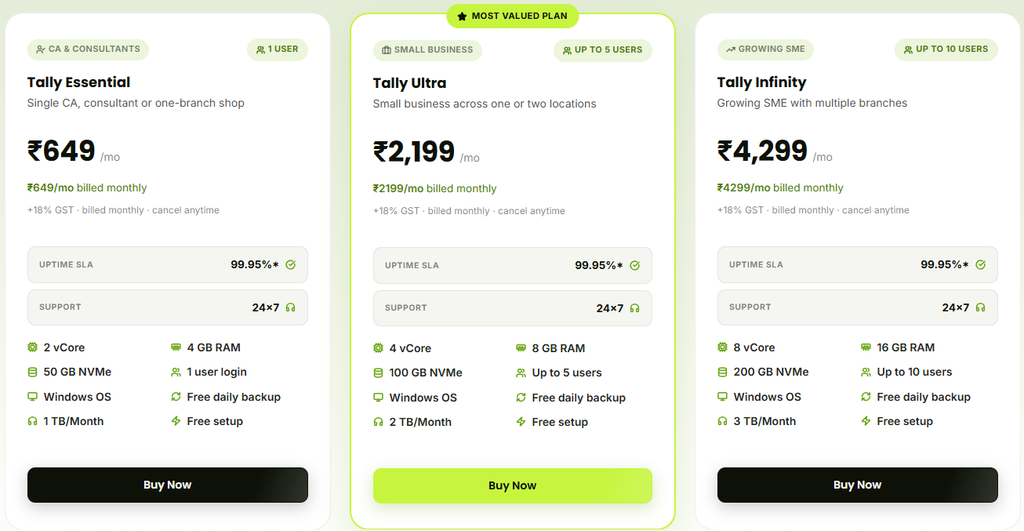
Every plan comes with TallyPrime pre-installed, free migration, free setup, automated daily backups, remote printing, a fully managed Windows Server and a 99.95% uptime SLA. You do not need to buy a Windows licence or look after the server.
| Tally Essential | Tally Ultra | Tally Infinity | |
| Price | ₹649/month | ₹2,199/month | ₹4,299/month |
| Users | 1 | Up to 5 | Up to 10 |
| CPU | 2 vCore | 4 vCore | 8 vCore |
| RAM | 4 GB | 8 GB | 16 GB |
| Storage | 50 GB NVMe | 100 GB NVMe | 200 GB NVMe |
| Bandwidth | 1 TB/month | 2 TB/month | 3 TB/month |
| Best for | Single CA, consultant or one branch shop | Small business across one or two locations | Growing SME with multiple branches |
All plans are billed monthly and can be cancelled anytime. Half yearly and yearly billing come with a discount, and you can see the exact saving on the plan page. Need more than 10 users? Larger teams are quoted on request.
Which Plan Should You Pick?
Two things decide it: how many people use Tally at the same time, and how big your company file is.
| Your Situation | Plan to Choose |
| Just you or your CA, small data | Tally Essential |
| Owner plus accounts team, a few GB of data | Tally Ultra |
| Multiple branches, heavy reports, many daily entries | Tally Infinity |
If you are unsure, start with the smaller plan. You can upgrade from Essential to Ultra to Infinity on the same server, so your company files, TDLs and settings stay exactly where they are.
Working alone and want the lowest cost? Our Shared Tally option starts at ₹399 a month for a single user.
Cloud or Your Own Office Server: Which Costs Less?
An office server feels cheaper on day one, until you add the Windows licence, UPS, AMC, electricity and the person you call when it stops working. Here is a rough three year comparison for a 5 user setup.
| Option | What It Includes | Approx. 3 Year Cost |
| Own server with AMC | Hardware, Windows, UPS, AMC, power, IT support | About ₹2.4 lakh |
| Own server without AMC | Same, but you fix problems yourself | About ₹1.7 lakh |
| Tally Ultra on cloud (monthly billing) | Fully managed server, backups, support | About ₹79,164 (₹2,199 x 36 months) |
The server figures are indicative market estimates for a typical Indian SME, and your numbers will depend on hardware and local costs. The Tally licence is needed in both cases, so it is not counted here. GST is extra on the cloud plan.
You also get things an office server does not give you easily: access from home or while travelling, live data for your CA, automatic nightly backups and no downtime from a power cut at the office.
How to Move Tally to the Cloud, Step by Step
The whole process takes about a working day. This is what you do and what we do.
- Check what you have. Note down how many people use Tally together, the size of your company data and whether you already own a TallyPrime licence.
- Choose your plan. Open the Tally on Cloud page on QloudRDP and pick Essential, Ultra or Infinity using the table above.
- Place your order. Click Buy Now and pay by UPI, card or net banking. PayPal, Bitcoin and USDT are also accepted.
- Keep your licence ready. Have your Tally licence details handy, or tell us you need help buying one.
- Take a fresh backup. Before the move, save a copy of your company data on your own computer. It is a habit worth keeping.
- We set everything up. Our engineers connect at a time you choose. They install TallyPrime with your licence, move your company files and TDLs, and map your office printers. Setup is free, and a working server is usually ready the same day, often within an hour.
- Test before you start billing. Open your company, run a few reports, print an invoice and check your GST and e-invoicing routine. Everything works exactly as it did on your desktop.
- Connect your team. Everyone logs in from Windows, Mac, Android or iOS using a Remote Desktop app, and works in the same company file.
- Add your CA or auditor. Create a separate login for them so they work on live data instead of waiting for backup files.
- Relax about backups. Automated daily backups start that night, and restore is available if you ever need to go back to an earlier day.
If something looks off in the first week, our 24/7 support is there to help. Every plan also has a 7 day money back guarantee, so you can try it without pressure.
FAQs
Does the Tally cloud price include the Tally licence?
No. The monthly price covers the cloud server, setup, migration, backups and support. The Tally licence is separate, and you can use the one you already own.
Is GST included in the price?
No. All plans are priced without 18% GST, which is added at checkout.
Can I pay month to month?
Yes. All plans are billed monthly and can be cancelled anytime. If you stay longer, half yearly and yearly billing cost less.
How many users can work at the same time?
Tally Essential is for 1 user, Tally Ultra for up to 5 and Tally Infinity for up to 10. Larger teams are quoted on request.
Do I have to buy Windows separately?
No. Every plan runs on a managed Windows Server (2019, 2022 or 2025) that we patch and look after for you.
Is my data backed up?
Yes. Automated daily backups are included in every plan, and you can ask for a restore if needed.
Can I use Tally from my Mac or phone?
Yes. You can connect from Windows, Mac, Android or iOS with any Remote Desktop app.
Can I upgrade later?
Yes. You can move from Essential to Ultra to Infinity on your existing server without reinstalling anything.
Conclusion
The real TallyPrime cloud price in India is your hosting plan plus your licence plus GST. If you already own Tally, you are looking at ₹649 a month for one user, or ₹2,199 and ₹4,299 for teams of up to 5 and 10.
Add a Tally rental if you need one, and you still end up well below the cost of running your own server.
Ready to move your accounts to the cloud? Pick a plan on QloudRDP, and our team will handle the setup and migration while you keep billing.