


Cyberin can meet the needs of many websites, but growing traffic, changing workloads, or different technical requirements can eventually make another hosting environment more suitable.
A good replacement should be judged by more than its advertised price. Resources, storage, security, migration, management, support, and upgrade flexibility can all affect the overall hosting experience.
This guide examines the practical factors worth considering before switching, helping you identify the type of hosting environment that makes the most sense for your website.
What Makes a Cyberin Alternative Worth Choosing?
Replacing a hosting provider makes sense when the new environment offers a better balance of resources, management, reliability, and future flexibility for your particular workload.
| Factor | What to Evaluate | Why It Matters |
| Hosting Cost | Entry and renewal pricing | Helps determine the long term expense |
| Server Resources | CPU, RAM, storage, bandwidth | Shows whether the plan can handle your workload |
| Performance | NVMe, LiteSpeed, caching | Can influence website responsiveness |
| Security | SSL, malware scanning, DDoS protection | Provides different layers of protection |
| Backups | Backup availability and recovery | Helps restore data after problems |
| Migration | Free or assisted transfers | Reduces the difficulty of switching |
| Control | cPanel, SPanel, managed services | Determines how much technical work you handle |
| Scalability | VPS, cloud, Windows, dedicated options | Gives you room to expand |
| Support | Availability and assistance | Useful when technical issues occur |
Start With Your Actual Requirements
CPU, RAM, storage, and bandwidth should be compared against your website’s workload rather than against another provider’s headline specifications.
Think About the Full Hosting Cost
A promotional starting price does not necessarily represent the cost throughout the entire subscription. Billing duration and renewal pricing should be checked before switching.
Do Not Overlook Migration
Moving a website can involve files, databases, domains, email, and configurations. A provider that offers migration assistance can make the transition considerably simpler.
Consider What Happens After Growth
Shared hosting may be enough for a smaller website today, but future traffic or application requirements can change that. Access to VPS, cloud, Windows, or dedicated hosting can provide a more practical upgrade path.
Cyberin Alternatives: Quick Comparison
Before going through each provider in detail, this comparison shows how the available options differ in pricing, hosting focus, and the type of workload they are positioned to handle.
| Provider | Starting Price | Best For | Notable Strength |
| YouStable | ₹59/mo | Overall hosting needs | Wide range of hosting environments |
| HostyCare | ₹59/mo | Budget shared hosting | NVMe, LiteSpeed and cPanel |
| ScalaHosting | $2.95/mo | Cloud focused projects | Managed and unmanaged cloud options |
| UltaHost | ₹420.05/mo* | Growing workloads | Multiple resource configurations |
| Bluehost | ₹3.99/mo* | Beginners and WordPress | AI tools and website management |
- YouStable – YouStable covers a broad range of requirements, from entry level shared hosting to VPS, Windows VPS, and dedicated server environments.
- HostyCare – HostyCare concentrates on shared hosting, with progressively larger plans for users who need more websites, storage, CPU, and RAM.
- ScalaHosting – ScalaHosting is oriented toward cloud infrastructure, offering both managed and unmanaged cloud options alongside standard web hosting.
- UltaHost – UltaHost provides different resource configurations, making it more relevant when CPU, RAM, storage, or bandwidth requirements are increasing.
- Bluehost – Bluehost focuses strongly on accessible website creation and WordPress management, while also offering broader hosting categories for growing projects.
Top 5 Cyberin Alternatives in 2026
This list brings together hosting options suited to different workloads, helping you compare what each one offers before deciding where your website should move.
1. YouStable – Best for a Smooth Hosting Upgrade Path
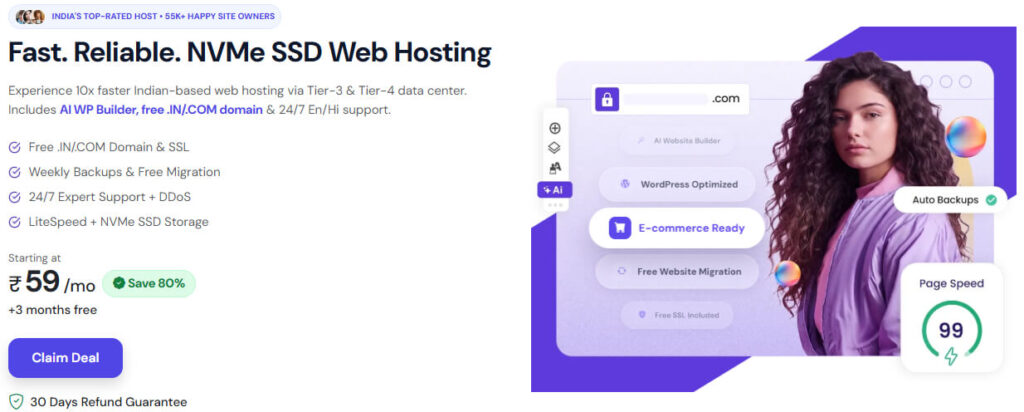
YouStable is a practical Cyberin alternative for websites that need affordable hosting today but may require stronger infrastructure as traffic, applications, or resource consumption increase.
Its displayed pricing starts at ₹59/month for Shared Hosting, with VPS at ₹349/month, Windows VPS at ₹1,899/month, and Dedicated Server hosting at ₹7,409/month.
The supplied material also highlights up to 80% off hosting, a free domain, free migration, 24/7 support, and a 30-day money-back guarantee, with applicable offers depending on the selected plan and billing period.
One Hosting Lineup for Different Workloads
The main advantage is the variety of environments available. A smaller website can begin with shared hosting and move to VPS, Windows VPS, or dedicated infrastructure when its requirements become more demanding.
Key Features
YouStable combines performance oriented infrastructure with security, migration assistance, and multiple hosting environments.
- NVMe SSD Storage – The displayed plans use NVMe storage for website files, databases, and application data.
- LiteSpeed + LSCache – These technologies provide a performance focused environment for websites that benefit from caching.
- Imunify360 Security – The supplied material highlights Imunify360 for malware detection and additional server level protection.
- Free SSL and Email – Supported plans include SSL and email services for essential website requirements.
- Free Website Migration – Migration assistance can simplify transferring an existing website from Cyberin.
- Multiple Hosting Environments – Shared hosting, VPS, Windows VPS, cPanel VPS, and dedicated servers provide different resource and control levels.
Specialized Options for Different Applications
The supplied material also lists WordPress Hosting, Node.js Hosting, cPanel Hosting, Linux VPS, OpenClaw VPS, and Windows VPS, giving users additional choices for specific technical requirements.
Plans & Pricing
The displayed plans cover several workload levels, making it possible to compare entry level hosting with more powerful infrastructure.
| Plan | Starting Price | Key Resources | Best For |
| Shared Hosting | ₹59/mo | 1 website, 50 GB NVMe SSD, unmetered bandwidth | Blogs and small websites |
| VPS Hosting | ₹349/mo | 1 CPU, 4 GB RAM, 50 GB NVMe, 4 TB bandwidth | Growing websites |
| Windows VPS | ₹1,899/mo | 2-core CPU, 4 GB RAM, 60 GB NVMe, 1 TB bandwidth | Windows applications |
| Dedicated Server | ₹7,409/mo | 4 CPU, 32 GB DDR4, 480 GB SSD | High resource workloads |
The pricing and specifications follow the supplied material. Promotional pricing and applicable offers can vary according to the selected plan and billing period.
2. HostyCare – Best for Affordable Shared Hosting

HostyCare is a practical Cyberin alternative for users who want to keep hosting costs low while retaining useful storage, performance, security, and website management features.
Its displayed plans start at ₹59/month, followed by ₹129, ₹239, and ₹599/month, with higher tiers increasing website capacity, NVMe storage, CPU, and RAM.
The supplied material also highlights an 85% hosting offer, alongside LiteSpeed, free SSL, migration, backups, daily malware scanning, cPanel, WordPress optimization, and 24/7 support.
A Shared Hosting Range That Scales Gradually
HostyCare’s main advantage is the progression between its plans. Users can increase website capacity and allocated resources while remaining within the shared hosting range.
Key Features
The platform combines performance, management, security, and recovery features for everyday shared hosting requirements.
- NVMe SSD Storage – Storage increases from 25 GB on Basic to 200 GB on Enterprise, providing more space for growing websites.
- LiteSpeed Web Server – LiteSpeed provides a performance focused hosting environment and supports compatible caching configurations.
- cPanel Control Panel – cPanel provides a familiar interface for managing websites, domains, databases, email, and hosting settings.
- Free SSL Certificate – SSL helps secure connections between visitors and the hosted website.
- Free Website Migration – Migration assistance can reduce the technical effort involved in transferring an existing website.
- Backup Functionality – Backups provide an additional recovery option when website files or data need restoration.
- Daily Malware Scanning – Regular scanning helps identify potentially harmful files and security issues within the hosting environment.
Higher Plans Expand Website Capacity
The displayed packages progressively increase website limits, storage, CPU, and RAM, making the upper tiers more suitable for users managing multiple or larger websites.
Plans & Pricing
HostyCare’s four displayed plans provide different combinations of website capacity and resources, allowing users to select a package according to their current hosting requirements.
| Plan | Price | Key Resources | Best For |
| Basic | ₹59/mo | 1 website, 25 GB NVMe, 1 CPU, 1 GB RAM | Blogs and small websites |
| Starter | ₹129/mo | 15 websites, 50 GB NVMe, 2 CPU, 2 GB RAM | Growing websites |
| Business | ₹239/mo | 60 websites, 120 GB NVMe, 3 CPU, 3 GB RAM | Small businesses |
| Enterprise | ₹599/mo | 120 websites, 200 GB NVMe, 4 CPU, 8 GB RAM | Larger websites |
The pricing and resource allocations above follow the supplied material. Promotional offers and billing conditions can change, so the applicable checkout price should be confirmed before purchase.
3. ScalaHosting – Best for Managed Cloud Flexibility

ScalaHosting is a strong Cyberin alternative for projects that need cloud infrastructure, managed services, or greater control than a conventional shared hosting environment provides.
Its displayed pricing starts at $2.95/month for Web Hosting, while Unmanaged Cloud starts at $19.95/month and Managed Cloud at $29.95/month. Cluster Hosting is available with custom pricing.
The supplied material also highlights cloud infrastructure, free website transfer, free app installation, 24/7 support, managed hosting, and a 30-day money-back guarantee, making it relevant for projects with stronger infrastructure requirements.
A Better Fit When Cloud Control Matters
ScalaHosting becomes more relevant when you need to choose between provider managed infrastructure and greater control over the server environment rather than relying only on traditional shared hosting.
Key Features
Its cloud focused offering combines infrastructure flexibility with management, security, backup, and migration capabilities.
- Cloud Infrastructure – Cloud based hosting provides an environment suited to websites with changing resource requirements.
- Managed Cloud Hosting – Managed services reduce the amount of routine server administration customers need to handle.
- SPanel Control Panel – SPanel centralizes website, domain, database, email, SSL, and hosting management functions.
- SShield Security – SShield provides security monitoring and protection for supported managed hosting environments.
- Daily Backups – Automated backups provide an additional recovery option when website data needs restoration.
- Free Website Transfer – Transfer assistance can simplify moving an existing website from another provider.
Two Approaches to Cloud Hosting
The availability of both managed and unmanaged cloud services gives users a choice based on how much server administration they want to handle themselves.
Plans & Pricing
The displayed lineup moves from standard web hosting into unmanaged and managed cloud environments, while cluster hosting is available for more specialized infrastructure requirements.
| Plan | Starting Price | Key Resources | Best For |
| Web Hosting | $2.95/mo | Cloud infrastructure, SSL, security and backups | Personal websites |
| Unmanaged Cloud | $19.95/mo | Cloud server resources and greater control | Developers |
| Managed Cloud | $29.95/mo | Managed cloud environment and dedicated resources | Businesses |
| Cluster Hosting | Custom | Clustered infrastructure and advanced configurations | High-demand projects |
The prices and plan information above follow the supplied material. Final pricing and available resources depend on the selected configuration and billing period.
4. UltaHost – Better Suited to Resource Heavy Websites

UltaHost is a practical Cyberin alternative for websites whose hosting requirements are increasing and need more CPU, RAM, storage, or bandwidth than basic plans provide.
Its displayed pricing starts at ₹420.05/month for Shared Starter and ₹659.26/month for VPS Basic, while higher configurations reach ₹4,524.87/month and ₹10,045.80/month.
The supplied material also highlights NVMe storage, free SSL, website migration, 24/7 support, 99.9% uptime, unlimited bandwidth, and DDoS protection, giving growing projects several useful infrastructure and security features.
When Additional Server Capacity Becomes Important
UltaHost is more relevant when a website has outgrown basic resource requirements. Its different configurations allow users to compare plans according to CPU, RAM, storage, and expected workload.
Key Features
The available plans combine resource flexibility with performance, security, migration, and connectivity features.
- NVMe SSD Storage – The displayed configurations use NVMe storage for website and application data.
- Multiple VPS Configurations – Different VPS levels provide varying CPU, RAM, and storage allocations.
- Higher Resource Options – Larger configurations provide considerably more capacity for demanding websites and applications.
- Unlimited Bandwidth – The supplied information highlights unlimited bandwidth for the relevant shared hosting offering.
- Free SSL and Migration – These features simplify website security and the process of transferring an existing website.
- DDoS Protection – DDoS protection adds an additional defensive layer against certain network level attacks.
Compare Resources Before Moving Up
The displayed lineup ranges from shared hosting to larger VPS configurations, so CPU, RAM, storage, and expected workload should guide the plan selection rather than price alone.
Plans & Pricing
UltaHost’s displayed configurations vary substantially in resources, making the following comparison useful when determining which level fits a website or application.
| Plan | Starting Price | Key Resources | Best For |
| Shared Starter | ₹420.05/mo | 10 GB NVMe SSD, 10,000 visits/month | Small websites |
| VPS Basic | ₹659.26/mo | 1 CPU, 1 GB RAM, 30 GB NVMe SSD | Growing websites |
| VPS Power Plus | ₹4,524.87/mo | 6 CPU, 8 GB RAM, 250 GB NVMe SSD | Larger applications |
| Ultra-X | ₹10,045.80/mo | 4 CPU, 4 cores, 500 GB NVMe SSD | High resource projects |
The pricing and resource specifications above follow the supplied material. Promotional pricing and billing conditions may change, so the final checkout price should be verified before purchase.
5. Bluehost – A Convenient Choice for WordPress Websites

Bluehost is a practical Cyberin alternative for beginners, bloggers, and businesses that want WordPress focused hosting alongside integrated tools for creating and managing websites.
Its displayed Starter plan begins at ₹3.99/month on a 36 month term and includes 10 websites, 10 GB NVMe storage, AI website tools, free migration, and a free domain for the first year.
Higher plans add storage and business capabilities, while Bluehost also offers VPS, cloud, dedicated, WooCommerce, and agency hosting, giving established websites additional options as their requirements develop.
Designed Around Easier Website Management
Bluehost is particularly relevant for users who want an integrated hosting experience rather than dealing with extensive server configuration themselves.
Key Features
The platform combines WordPress hosting with website creation, migration, storage, and broader hosting services.
- NVMe SSD Storage – The displayed plans use NVMe storage for website files and database data.
- AI Website Tools – AI-assisted features help users create website content and layouts without building every element manually.
- WordPress Hosting – WordPress focused services provide an environment designed around creating and managing WordPress websites.
- Free Domain and SSL – Eligible plans include a free domain for the first year alongside SSL.
- Free Migration – Migration tools can simplify transferring an existing website to Bluehost.
- Multiple Hosting Types – VPS, cloud, dedicated, WooCommerce, and agency hosting provide additional choices as projects grow.
Room for Different Website Types
The supplied material extends beyond basic WordPress hosting by including broader hosting categories, giving established websites additional environments to consider as their requirements change.
Plans & Pricing
The displayed plans cover entry level websites, growing projects, and online stores, with higher tiers adding additional capabilities.
| Plan | Starting Price | Key Resources | Best For |
| Starter | ₹3.99/mo | 10 websites, 10 GB NVMe | Beginners and blogs |
| Business | ₹6.99/mo | More storage, security and backups | Growing websites |
| eCommerce Essentials | ₹14.99/mo | Online store features and additional tools | eCommerce websites |
| Higher Tier | ₹21.99/mo | Higher resources and features | Larger websites |
The ₹3.99/month Starter price is promotional and applies to the displayed 36 month billing term. Renewal pricing is higher, so both the initial term and renewal cost should be considered before purchasing.
Which Cyberin Alternative Should You Choose?
The best replacement depends on your website’s workload, budget, technical requirements, and the type of hosting environment you expect to use. This comparison highlights the most suitable choice for each situation.
| Provider | Best For | Main Advantage | Ideal When |
| YouStable | Overall flexibility | Broad hosting lineup | You may need to upgrade from shared hosting later |
| HostyCare | Budget shared hosting | Low cost plans with useful features | You want to remain on shared hosting |
| ScalaHosting | Cloud infrastructure | Managed and unmanaged cloud options | You need more cloud control or provider management |
| UltaHost | Resource growth | Multiple CPU, RAM, and storage configurations | Your workload is becoming more demanding |
| Bluehost | WordPress beginners | Integrated website tools | You prefer simple website creation and management |
Choose YouStable for Long Term Hosting Flexibility
YouStable is the strongest overall option when you want an affordable starting point without giving up access to VPS, Windows VPS, or dedicated infrastructure later.
Pick HostyCare for Affordable Shared Hosting
HostyCare makes more sense when keeping costs low is important and your websites can continue operating within a shared hosting environment.
Consider ScalaHosting for Cloud Requirements
ScalaHosting is better suited to projects where cloud infrastructure, managed services, or greater server control are central to the hosting decision.
Use UltaHost for Increasing Resource Needs
UltaHost is worth considering when your website or application needs progressively higher CPU, RAM, storage, or bandwidth allocations.
Go With Bluehost for Simpler WordPress Management
Bluehost is a practical fit for beginners and WordPress users who value integrated website creation, AI assisted tools, migration, and straightforward management.
Conclusion
The best Cyberin alternative depends on the resources your website consumes, the level of management you prefer, and whether you expect those requirements to increase over time.
YouStable takes the top position because it provides the widest progression in this comparison, starting at ₹59/month for Shared Hosting and extending through VPS, Windows VPS, and Dedicated Server hosting.
HostyCare is a better fit for users who want affordable shared hosting with NVMe storage, LiteSpeed, cPanel, backups, and malware scanning. ScalaHosting is more appropriate when cloud infrastructure and managed or unmanaged hosting are important considerations.
UltaHost makes more sense for websites with increasing resource requirements, while Bluehost is particularly convenient for beginners and WordPress users who prefer integrated website creation and management tools.
Before switching, compare plan resources, promotional and renewal pricing, storage, security, backups, migration assistance, management options, support, and available upgrades. A good replacement should address your current hosting needs without creating unnecessary limitations as your website grows.